
Looking to improve your DIY skills? If you don’t have one already, consider adding an OBD scanner to your diagnostic tool kit. Let’s go over what an OBD scanner is used for, how to use one, and how to pick the best one for you and your vehicle.
Choosing the Best OBD Scanner

- Difficulty: Easy
- Duration: 10 minutes
- How often: When needed
What Is It?
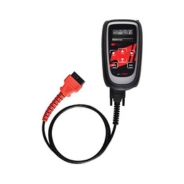
Most vehicles have onboard diagnostic computers (OBDs). An OBD scanner can read the data stored on this computer. Some also have built-in testing equipment, such as scopes and multimeters. Adding an OBD scanner to your tool kit can help you diagnose and troubleshoot various problems with your vehicle so you can avoid paying for a professional assessment.
The main time an OBD scanner comes in handy is to diagnose a problem when your check engine light comes on.
How to Use an OBD Scanner
To use most OBD scanners, follow these general steps:
- Plug the OBD scanner into the OBD port of your vehicle. This’ll likely be under the driver’s side dashboard near the pedals.
- Turn on the ignition, but don’t start the engine. You’ll see a message like “establishing link with OBD” on the scanner. If the scanner doesn’t turn on, check the connection to make sure power is coming through the car’s auxiliary power outlet.
- Enter your vehicle’s identification number (VIN), make, model, and engine type.
- Go to the Codes menu on the scanner. Active Codes or Diagnostic Trouble Codes (DTCs) refer to issues causing the check engine light to stay on. Pending Codes are errors that have occurred before but haven’t triggered the check engine light yet.
- Interpret the characters in the OBD code. Your scanner should come with instructions on how to decode and diagnose problems with your vehicle. You can also research DTCs online to decode them.
Some newer OBD scanners are equipped with Bluetooth and can display your car’s information using an app on a smartphone or tablet. Read the instructions of the scanner you pick to find out how to connect it to your car.
Picking a Scanner
Not every scanner will work with every car. If your car was built in 1995 or earlier, you’ll need an OBD-I scanner. For vehicles manufactured in 1996 or later, you’ll need an OBD-II scanner. The specific make and model of your car can also affect which scanners it can be paired with. (Please also keep in mind that cars manufactured before 1996 may not have an OBD port at all.)
Pricing for OBD scanners can range dramatically. Some go for as little as $50 while others can cost up to $3,000. This pricing will depend on what you want out of a scanner.
To pick an OBD scanner, consider the following:
- How familiar you are with automotive tasks.
- What kind of car(s) you will be using the scanner on.
- What connection style(s) you want (Bluetooth, cable, USB, Wi-Fi).
- How much you’re willing to spend.
Once you have these answers, you can research your options and compare verified reviews of different scanners to find which one is best suited to your needs.
Also consider purchasing an OBD port lock: this is exactly what it sounds like. It acts as a lock for the OBD port to slow down thieves. (This is because thieves need to access the OBD port if they are using an unauthorized copy of your key.)
We have a wide range of OBD scanners and car code readers available on NAPACanada.com. If you have any questions about picking a diagnostic tool, visit your local NAPA Auto Parts store to speak with an expert.
 Author:
 No comments